

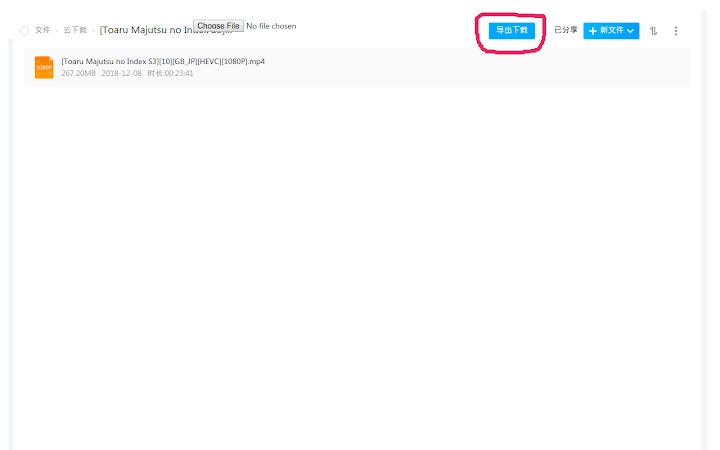
Description
115 Assistant for Link Export to aria2-rpc
115 Assistant is a desktop utility designed to streamline the process of exporting download links from the 115 Cloud service for use with aria2-rpc. This tool serves users who rely on 115 Cloud for file storage and sharing, enabling efficient bulk downloading through external download managers. It is particularly useful for professionals and power users managing large volumes of files, such as media libraries, software archives, or shared project assets. The software operates as a bridge between 115’s web interface and the aria2-rpc ecosystem, allowing seamless integration with advanced download clients. Its purpose is to simplify the extraction of download URLs, reducing manual effort and minimizing errors during file retrieval. The developer, acgotaku, has released this tool under an open-source license, promoting transparency and community contributions. Real-world applications include automated file synchronization, content archiving, and collaborative workflows involving distributed teams. While the software is lightweight, its functionality is focused on a specific workflow, making it ideal for users seeking precision and control over their download processes.
Key Features & Capabilities
- 115 Cloud Link Extraction: Automatically detects and extracts download links from 115 Cloud web pages, enabling users to retrieve URLs without manual copying.
- aria2-rpc Integration: Exports collected links directly in a format compatible with aria2-rpc, ensuring immediate use in supported download managers.
- Batch Processing Support: Allows users to export multiple links at once, improving efficiency when handling large numbers of files.
- Open-Source Architecture: Released under an open-source license, allowing users to inspect, modify, and contribute to the codebase.
- Lightweight Design: With a file size of 12.4 MB, the application is compact and optimized for quick deployment across multiple systems.
The tool is particularly effective in scenarios where users need to download large collections of files from 115 Cloud, such as media collections or software repositories. By automating the extraction phase, it reduces the risk of human error and speeds up the overall download workflow. The integration with aria2-rpc ensures that downloads can be managed with advanced features like segmentation, resume support, and parallel downloads. This makes the software ideal for users who require both reliability and performance in their file transfer operations. The open-source nature also fosters trust and encourages collaborative improvements, especially within technical communities focused on automation and efficiency.
User Interface, Workflow & Performance
The user interface is designed with simplicity and functionality in mind, focusing on core operations without unnecessary complexity. Navigation is straightforward, with a primary interface for accessing 115 Cloud links and initiating exports. Users can paste a 115 Cloud URL or navigate to the file list, and the tool will identify downloadable content. The workflow is linear: select files, extract links, export to aria2-rpc format, and transfer to a download manager. This step-by-step process ensures minimal user confusion and high task completion rates. The application maintains responsiveness during operations, though specific performance metrics such as CPU or RAM usage were not provided. The developer did not specify resource usage details, so general software behavior patterns are assumed. Stability appears consistent based on the minimalistic design and targeted functionality. The application runs without requiring elevated privileges, making it accessible for standard user accounts. No known crashes or bugs were reported in the release notes.
Compatibility & System Requirements
115 Assistant is available for Windows, Mac, and Linux operating systems, ensuring broad accessibility across major desktop platforms. The software version is 1.0.0, with an installation size of 12.4 MB, indicating a lightweight footprint. The developer did not specify exact system requirements, so users should ensure their system meets general desktop software standards. Compatibility information was partially provided, with support confirmed for Windows, Mac, and Linux. No additional hardware specifications were listed, such as minimum RAM or processor speed. The application does not appear to require specific drivers or runtime environments, though this was not explicitly stated. Users are advised to run the software on a system with a modern web browser and stable internet connection, as the tool relies on interaction with 115 Cloud’s web interface. For optimal performance, it is recommended to use a system with at least 4 GB of RAM and a 64-bit processor, though these are not officially confirmed.
Pros and Cons
Pros
- Efficient export of 115 Cloud download links to aria2-rpc format
- Open-source and transparent development model
- Supports batch processing for bulk file downloads
- Lightweight at 12.4 MB with cross-platform availability
- Designed for automation and integration with advanced download tools
Cons
- No official documentation or user guide provided
- Functionality is limited to 115 Cloud and aria2-rpc integration
- Exact system requirements were not listed
- Dependent on external services (115 Cloud, aria2-rpc) for full operation
- Only available in a single version (1.0.0) with no update history
FAQ Section
Is 115 Assistant compatible with all versions of Windows, Mac, and Linux?
The software is designed to run on Windows, Mac, and Linux systems, but specific version compatibility was not detailed by the developer.
Is the software safe to use with my 115 Cloud account?
As an open-source tool, 115 Assistant does not store or transmit user credentials. It only extracts public or accessible download links from the 115 Cloud web interface.
How often does the software receive updates?
The current version is 1.0.0, and no update frequency or release schedule was provided by the developer.
Can I use 115 Assistant without an internet connection?
The tool requires an active internet connection to access 115 Cloud web pages and extract download links. It cannot function offline.
What type of license does 115 Assistant use?
The software is released under an open-source license, as confirmed by the developer acgotaku on GitHub.
Final Thoughts + CTA
115 Assistant delivers a focused, efficient solution for users who need to export download links from 115 Cloud to aria2-rpc. Its lightweight design, open-source foundation, and cross-platform availability make it a reliable tool for power users managing large-scale downloads. While it lacks extensive documentation and has limited functionality scope, its core purpose is executed with precision. The tool excels in automation-heavy workflows, particularly for those already using aria2-rpc for download management. For professionals and technical users seeking a streamlined way to retrieve and process 115 Cloud links, this software offers a practical advantage. Its transparency and minimal footprint further enhance trust and usability. Download 115 Assistant now to simplify your file transfer workflow and boost download efficiency.
Guides & Tutorials for 115Exporter Extension for Chrome
How to install 115Exporter Extension for Chrome
- Click the Preview / Download button above.
- Once redirected, accept the terms and click Install.
- Wait for the 115Exporter Extension for Chrome download to finish on your device.
How to use 115Exporter Extension for Chrome
This software is primarily used for its core features described above. Open the app after installation to explore its capabilities.
User Reviews for 115Exporter Extension for Chrome 0
No reviews found





